0 ratings

Item #:
174103480
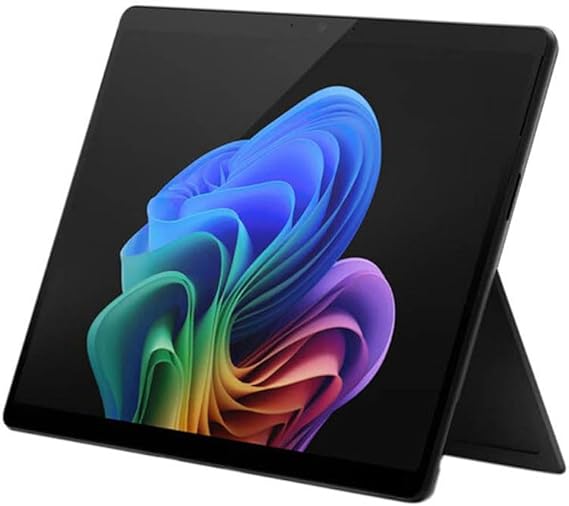
Microsoft Surface Pro for Business 2-n-1 Laptop/Tablet (2025) Windows 11 Pro Copilot+ PC, 13" Touchscreen Display, Intel Core Ultra 5 (Series 2),
Item #:
174103480
GBP 1664
Price Details
Excluding Shipping & Custom charges ( Shipping and custom charges will be calculated on checkout )
*All items will import from US
0 ratings
Write a review
In stock
 Imported from USA store
QTY:
Order now and get it around Tuesday, September 01
Secured transaction
Ubuy works hard to protect your security and privacy. Our advanced payment security system ensures confidentiality by encrypting your information during transmission using AES (Advanced Encryption Standards) and SSL (Secure Socket Layer) protocols. Your payment details are 100% secure as we do not share your payment details with third party sellers.
Our Top Logistics Partners


Power through tasks with up to 14 hours of battery, and recharge in a snap with Fast Charging.

Fast
Shipping

Free
Return*

Secure Packaging

100% Original Products

PCI DSS Compliance

ISO 27001 Certified



Note: Step Down Voltage Transformer required for using electronics products of US store (110-120). Recommended power converters Buy Now.


What Stands Out
Versatile Design
The Microsoft Surface Pro 11 combines a tablet's portability with a laptop's functionality, allowing seamless transitions between work and play, making it perfect for professionals and students alike.
VPro Technology
Equipped with Intel's VPro technology, this device offers enhanced security and manageability features, delivering peace of mind for businesses handling sensitive data.
Performance Powerhouse
With 16GB of RAM and a 256GB SSD, the Surface Pro 11 ensures high-speed performance and ample storage, tackling demanding tasks efficiently without compromising speed.
Product Details
| Brand | Microsoft |
| Model Name | Surface Pro 11 |
| Screen Size | 13 Inches (33 cm) |
| Color | Black |
| Hard Disk Size | 256 TB |
| Ram Memory Installed Size | 16 GB |
| Operating System | Windows, Windows 11 Pro |
| Special Feature | Anti-reflective, Built-in Kickstand, Corning Gorilla Glass 5, Facial Recognition, High Dynamic Range (HDR), Slate, Trusted Platform Module (TPM), Volume Control Button See more |
| Graphics Card Description | Integrated |
| Graphics Coprocessor | Intel Arc Graphics 130V |
| Country of Origin | This item will be imported from US |
| What is in the box | Microsoft Surface Pro for... For more details, please check description/product details |
| Item Weight | 2.4 lbs (1.09 kg) |
| Date First Available | June 13, 2025 |
Who Should Buy?

-
Business Professionals
Ideal for professionals needing a portable device for meetings, presentations, and on-the-go productivity with Windows 11 Pro.
-
Students
Perfect for students who require a versatile device for studying, note-taking, and research with robust performance.
-
Creative Individuals
Beneficial for creatives using design software due to its powerful specs and touchscreen capabilities for artwork.

-
Heavy Gamers
Not suitable for gamers seeking high-end graphics performance, as it’s not tailored for demanding gaming requirements.
Product Description
Microsoft Surface Pro for Business 2-n-1 Laptop/Tablet (2025) Windows 11 Pro Copilot+ PC, 13" Touchscreen Display, Intel Core Ultra 5 (Series 2), 16GB RAM, 256GB SSD Storage, Black
Have any Query? Chat with us
Customer Questions & Answers
-
Question:
What is the display size of the Microsoft Surface Pro 11 Copilot+?
Answer: The Microsoft Surface Pro 11 Copilot+ features a vibrant 13-inch display. This size strikes a perfect balance between portability and productivity, making it ideal for both professional and personal use. With a high-resolution screen, you can enjoy sharp images and clear text, whether you are working on documents, streaming videos, or presenting in meetings. This makes the Surface Pro 11 an excellent choice for anyone needing a versatile device for various tasks. -
Question:
What is vPro technology, and how does it benefit the Surface Pro 11?
Answer: vPro technology in the Microsoft Surface Pro 11 enhances security and management capabilities. It is particularly beneficial for business users as it provides improved remote management features, allowing IT departments to remotely access and manage devices. This means that organizations can maintain system health and update software without being physically present. Additionally, vPro offers advanced security features, making the Surface Pro 11 a suitable option for users handling sensitive data. -
Question:
Can I use the Surface Pro 11 for gaming?
Answer: While the Microsoft Surface Pro 11 is primarily designed for productivity, it can handle casual gaming well thanks to its capable specs. The 16 GB RAM and solid-state drive (SSD) allow for smooth multitasking and quick loading times. However, for intensive gaming, it's advisable to check game requirements, as integrated graphics may not run high-demand games as efficiently as dedicated gaming laptops. Still, it's perfect for lighter games and casual play during breaks. -
Question:
What are the key features of Windows 11 Pro on the Surface Pro 11?
Answer: Windows 11 Pro brings a host of features to the Surface Pro 11, including enhanced multitasking capabilities with Snap Layouts, virtual desktops, and improved touchscreen support. The operating system is optimized for touch input, making it feel intuitive on the Surface's tablet form. Additionally, the Pro version offers advanced security features and tools that are beneficial for business users, ensuring a productive and secure computing experience, whether at home or in the office. -
Question:
Is the Surface Pro 11 good for creative professionals?
Answer: Absolutely! The Microsoft Surface Pro 11 is an excellent choice for creative professionals. Its 13-inch high-resolution touchscreen provides a canvas for design work, while the powerful specifications support demanding applications like Adobe Creative Suite. With the optional Surface Pen, artists can sketch directly on the screen, making it a powerful tool for graphic designers, photographers, and video editors seeking flexibility and portability in their workstations. -
Question:
What kind of ports does the Surface Pro 11 have?
Answer: The Microsoft Surface Pro 11 comes equipped with essential ports, including USB-C ports and a Surface Connect port. This range allows users to connect various peripherals, such as external monitors, storage devices, and even docking stations for a desktop-like experience. The inclusion of USB-C also enhances the device's versatility, making it easier to charge and connect to multiple external devices, ideal for a professional environment. -
Question:
What is the battery life of the Surface Pro 11?
Answer: The Microsoft Surface Pro 11 offers impressive battery life, allowing users to work throughout the day without interruption. Depending on usage, it can last up to 15 hours or more, making it suitable for meetings, travel, or work sessions without needing to recharge. This extended battery life is vital for professionals and students who need to stay productive on the go, whether in cafes, libraries, or during long commutes. -
Question:
Can I connect the Surface Pro 11 to an external monitor?
Answer: Yes, you can easily connect the Microsoft Surface Pro 11 to an external monitor. With the USB-C ports, you can use compatible cables or adapters to connect to monitors and enjoy a dual-screen setup. This capability is particularly useful for multitasking or extending your workspace, whether for presentations, design work, or simply increasing your productivity by having multiple applications visible at once. -
Question:
What accessories are available for the Surface Pro 11?
Answer: The Surface Pro 11 supports a variety of accessories to enhance your experience. Notably, the Surface Pen allows for precise input and creativity, while the Surface Type Cover provides a full keyboard for comfortable typing. Additionally, there are docking stations available that expand connectivity options, enabling users to connect additional monitors and devices easily. These accessories can significantly improve functionality and customization for users with specific needs. -
Question:
Where can I buy Microsoft Surface Pro 11 Copilot+?
Answer: You can purchase the Microsoft Surface Pro 11 Copilot+ PC Tablet from Ubuy. Ubuy offers a reliable platform for securing this advanced tablet, ensuring you're procuring an authentic product. With a variety of models available for selection, Ubuy caters to customers across Guernsey, making it a convenient choice to shop for your Surface Pro 11 needs.
Microsoft Tablets Editorial Review
No editorial reviews found
Customer Reviews & Ratings
1 customers ratings
-
5 Star
100%
-
4 Star
0%
-
3 Star
0%
-
2 Star
0%
-
1 Star
0%
Review this product
Share your thoughts with other customers
Platform Trust & Buyer Confidence

MA
Mohammad
Verified buyer
“Excellent quality and original too,when ubuy send original things I will appreciate that ,I very satisfied thank you”
23 July 2026 · via Trustpilot
CK
Chitra
Verified buyer
“The order and delivery progress was communicated very well. Package arrived within the estimated time. Products arrived as expected in good condition.”
22-Jul-26 · via Trustpilot
K
kund
Verified buyer
“Good supply of products. Safe payment methods, and shipment worldwide! Genuine products.”
23-Jul-26 · via Trustpilot
OO
Onesi
Verified buyer
“Was my first time buying a product from Ubuy, but I found it so helpful. This is reliable. Gonna place a new order!”
22 July 2026 · via Trustpilot
SJ
SAO JOHN
Verified buyer
“Ubuy is a great online platform to buy stuff. Reliable, fast delivery time and great value for money. I've been using Ubuy online shopping platform for three years now and will continue to do so.”
23 July 2026 · via Trustpilot
Secure Checkout
Global Delivery
Easy Returns
Genuine Products
Product Price History
Important information
- Limitations : For products shipped internationally, please note that any manufacturer warranty may not be valid; manufacturer service options may not be available; product manuals, instructions, and safety warnings may not be in destination country languages; the products (and accompanying materials) may not be designed in accordance with destination country standards, specifications, and labeling requirements; and the products may not conform to destination country voltage and other electrical standards (requiring use of an adapter or converter if appropriate). The recipient is responsible for assuring that the product can be lawfully imported to the destination country. When ordering from Ubuy or its affiliates, the recipient is the importer of record and must comply with all laws and regulations of the destination country.
- Not all the products listed on Ubuy are for sale, as Ubuy is a global search engine. Products are subject to export/trade regulations.
GBP 1664
Order now and get it around Tuesday, September 01
This item is not restrict in my country.(Please click on above link if this item is not restrict in your country, So our team will review and allow.)
QTY:
Secured transaction
PCI DSS compliant and ISO 27001:2022 certified, with encrypted payments and full buyer protection on every order.
Our Top Logistics Partners
Fastest cross-border delivery
Features & Benefits
- Exceptional performance with Intel® Core™ Ultra processors.
- All-day battery life of up to 14 hours with fast charging.
- AI processing capabilities with Intel® AI Boost NPU for enhanced experiences.
- Flexible design with a 165-degree adjustable kickstand for comfortable use.
- Supports multiple input types: pen, touch, and voice commands.
- Ultralight, durable, and equipped with advanced connectivity options.
Ubuy Assurance
Experience worry-free shopping with 100% original products, PCI DSS-compliant payment security, ISO 27001-certified data protection, the fastest cross-border delivery, free returns *, and secure packaging on every order.