0 ratings





Item #:
221452298
Acer Thunderbolt 4 Dock, 16 in 1 DisplayLink Docking Station 4 Monitor, 3TB4+2HDMI+2DP, Up to 8K & 40Gbps, 160W Power, 2.5G Ethernet, SD4.0, USB C
 1 Sustainability Highlights
Item #:
221452298
GBP 258
Price Details
Excluding Shipping & Custom charges ( Shipping and custom charges will be calculated on checkout )
*All items will import from US
In stock
 Imported from USA store
QTY:
Order now and get it around Saturday, August 01
Secured transaction
Ubuy works hard to protect your security and privacy. Our advanced payment security system ensures confidentiality by encrypting your information during transmission using AES (Advanced Encryption Standards) and SSL (Secure Socket Layer) protocols. Your payment details are 100% secure as we do not share your payment details with third party sellers.
Our Top Logistics Partners


This Thunderbolt 4 dock offers high performance and versatile connectivity to meet all your needs.

Fast
Shipping

Free
Return*

Secure Packaging

100% Original Products

PCI DSS Compliance

ISO 27001 Certified


Note: Step Down Voltage Transformer required for using electronics products of US store (110-120). Recommended power converters Buy Now.


What Stands Out
Versatile Connectivity
With 16 ports including USB-C, HDMI, and DisplayPort, this dock ensures compatibility with multiple devices and monitors, appealing to diverse users from professionals to gamers.
High Resolution Support
Capable of up to 8K resolution, this dock offers stunning visuals for creative professionals, providing an unparalleled viewing experience for design, editing, and gaming tasks.
Robust Power Delivery
Delivers 160W power, efficiently charging laptops while powering peripherals, addressing the user need for a single solution to minimize clutter and maximize productivity.
Product Details
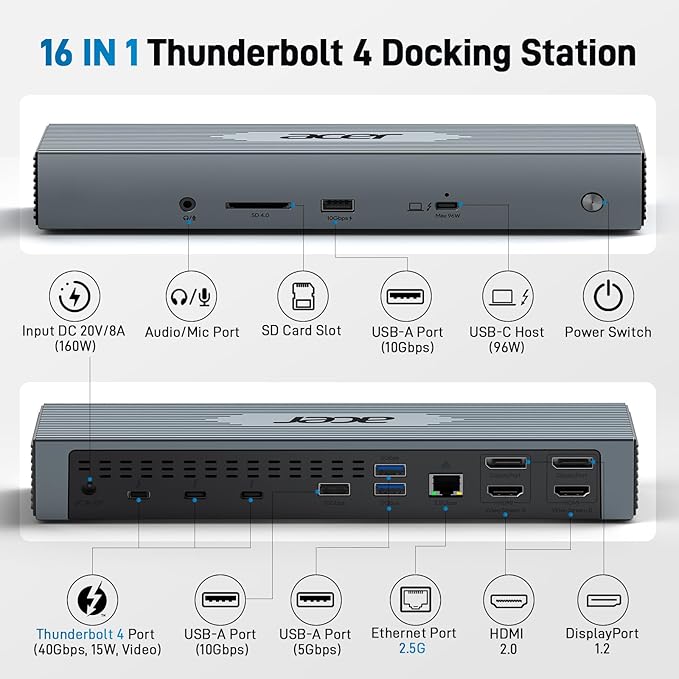
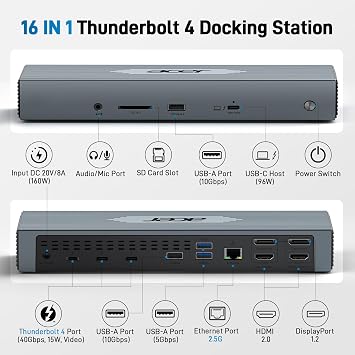
- 【16-in-1 Full-Feature Thunderbolt 4 Dock】This thunderbolt 4 dock is equipped with 3×Thunderbolt 4 (8K@30Hz & 40Gbps), 2×HDMI (4K@60Hz), 2×DisplayPort (4K@60Hz), 2×USB-A (10Gbps), 2×USB-A (5Gbps), 2.5G Ethernet, SD4.0 (312MB/s), audio/mic port, USB-C Host (PD 96W), and an Input 160W DC power port — offering high performance and versatile connectivity to meet all your needs. 📌𝐍𝐨𝐭𝐞: 𝐏𝐥𝐞𝐚𝐬𝐞 𝐝𝐨𝐰𝐧𝐥𝐨𝐚𝐝 𝐭𝐡𝐞 𝐥𝐚𝐭𝐞𝐬𝐭 𝐃𝐢𝐬𝐩𝐥𝐚𝐲𝐋𝐢𝐧𝐤 𝐝𝐫𝐢𝐯𝐞𝐫 𝐛𝐞𝐟𝐨𝐫𝐞 𝐮𝐬𝐢𝐧𝐠 𝐭𝐡𝐞 𝐝𝐨𝐜𝐤.
- 【Single 8K or Quad 4K@60Hz Display】The thunderbolt 4 docking station supports a single 8K@30Hz display or up to four 4K@60Hz displays. 📌𝐍𝐨𝐭𝐞: 𝐄𝐧𝐬𝐮𝐫𝐞 𝐲𝐨𝐮𝐫 𝐥𝐚𝐩𝐭𝐨𝐩 𝐬𝐮𝐩𝐩𝐨𝐫𝐭𝐬 𝐃𝐏 𝐀𝐥𝐭 𝐌𝐨𝐝𝐞 𝐚𝐧𝐝 𝐡𝐚𝐬 𝐬𝐮𝐟𝐟𝐢𝐜𝐢𝐞𝐧𝐭 𝐛𝐚𝐧𝐝𝐰𝐢𝐝𝐭𝐡 𝐟𝐨𝐫 𝐟𝐨𝐮𝐫 𝟒𝐊@𝟔𝟎𝐇𝐳 𝐦𝐨𝐧𝐢𝐭𝐨𝐫𝐬; 𝐨𝐭𝐡𝐞𝐫𝐰𝐢𝐬𝐞, 𝐝𝐢𝐬𝐩𝐥𝐚𝐲 𝐩𝐞𝐫𝐟𝐨𝐫𝐦𝐚𝐧𝐜𝐞 𝐦𝐚𝐲 𝐛𝐞 𝐫𝐞𝐝𝐮𝐜𝐞𝐝.
- 【Fast 40Gbps Data Transfer】The Thunderbolt 4 Dock features three Thunderbolt 4 ports supporting ultra-fast 40Gbps data transfer, allowing you to move large files in seconds. It also includes 2×USB-A 3.2 (10Gbps) and 2×USB-A 3.0 (5Gbps) ports for versatile connectivity, while the built-in SD 4.0 card reader offers transfer speeds up to 312MB/s for even greater flexibility.
- 【160W Super Power Adapter】The laptop docking station comes with a powerful 160W adapter, delivering reliable power for any Thunderbolt or USB-C host device. The USB-C host port provides up to 96W PD to charge the connected laptop (host device) only. 📌Note: Ensure your laptop’s USB-C port supports the PD protocol to enable high-speed charging.📌Note: The dock requires re-press the power button to restart after a power loss.
- 【2.5 Gigabit Ethernet】The Thunderbolt Dock features a 2.5Gbps Ethernet (RJ45) port for a stable, ultra-fast wired network connection, backward compatible with 1Gbps and 100Mbps devices. It also includes a 3.5mm audio/microphone jack for easy connection to headphones or mics, ensuring crystal-clear communication and rich, immersive sound quality.
- 【Perfect Displaylink Dock for MacBook Users】The Thunderbolt 4 Docking Station with a built-in DisplayLink chip is an excellent choice for MacBook users who need extended screen capability. It supports MST mode on macOS, allowing multiple external displays without limitations. To enable full multi-display functionality, please install the official DisplayLink driver. 📌Note: Only M1/M2 Max or newer Mac models support up to 5 displays (laptop + 4 external monitors).
| Hardware Interface | 3.5mm Audio, DisplayPort, Ethernet, HDMI, Thunderbolt 4, USB 3.2 Gen 2, USB Docking Station |
| Compatible Devices | 𝐀𝐥𝐥 𝐋𝐚𝐩𝐭𝐨𝐩𝐬 𝐚𝐧𝐝 𝐒𝐦𝐚𝐫𝐭𝐩𝐡𝐨𝐧𝐞𝐬 𝐰𝐢𝐭𝐡 𝐓𝐡𝐮𝐧𝐝𝐞𝐫𝐛𝐨𝐥𝐭 𝟒, 𝐓𝐡𝐮𝐧𝐝𝐞𝐫𝐛𝐨𝐥𝐭 𝟑, 𝐃𝐢𝐬𝐩𝐥𝐚𝐲𝐏𝐨𝐫𝐭 𝐀𝐥𝐭𝐞𝐫𝐧𝐚𝐭𝐞 𝐌𝐨𝐝𝐞 (𝐃𝐏 𝐀𝐥𝐭 𝐌𝐨𝐝𝐞)——𝐒𝐮𝐩𝐩𝐨𝐫𝐭 𝐃𝐢𝐬𝐩𝐥𝐚𝐲, 𝐂𝐡𝐚𝐫𝐠𝐢𝐧𝐠, 𝐃𝐚𝐭𝐚 𝐓𝐫𝐚𝐧𝐬𝐟𝐞𝐫 𝐏𝐫𝐨𝐭𝐨𝐜𝐨𝐥. Such as MacBook Pro/Air, HP ProBook, EliteBook, Spectre x360 series, Dell XPS 13/15/17, Dell Latitude, Dell Inspiron, Lenovo ThinkPad, Lenovo IdeaPad, Lenovo Yoga, Microsoft Surface Pro 7/8/9, ASUS, Acer, Galaxy S23, and more. |
| Total Usb Ports | 4 |
| Number of Ports | 16 |
| Total Number of HDMI Ports | 2 |
| Wattage | 160.0 |
| Item Dimensions L x W x H | 9.55"L x 3.15"W x 1.55"H (24.3 x 8 x 3.9 cm) |
| Color | Grey |
| Brand | Acer |
| UPC | 195133190534 |
| Manufacturer | acer |
| Model Number | ODK490 |
| Compatible Devices | 𝐀𝐥𝐥 𝐋𝐚𝐩𝐭𝐨𝐩𝐬 𝐚𝐧𝐝 𝐒𝐦𝐚𝐫𝐭𝐩𝐡𝐨𝐧𝐞𝐬 𝐰𝐢𝐭𝐡 𝐓𝐡𝐮𝐧𝐝𝐞𝐫𝐛𝐨𝐥𝐭 𝟒, 𝐓𝐡𝐮𝐧𝐝𝐞𝐫𝐛𝐨𝐥𝐭 𝟑, 𝐃𝐢𝐬𝐩𝐥𝐚𝐲𝐏𝐨𝐫𝐭 𝐀𝐥𝐭𝐞𝐫𝐧𝐚𝐭𝐞 𝐌𝐨𝐝𝐞 (𝐃𝐏 𝐀𝐥𝐭 𝐌𝐨𝐝𝐞)——𝐒𝐮𝐩𝐩𝐨𝐫𝐭 𝐃𝐢𝐬𝐩𝐥𝐚𝐲, 𝐂𝐡𝐚𝐫𝐠𝐢𝐧𝐠, 𝐃𝐚𝐭𝐚 𝐓𝐫𝐚𝐧𝐬𝐟𝐞𝐫 𝐏𝐫𝐨𝐭𝐨𝐜𝐨𝐥. Such as MacBook Pro/Air, HP ProBook, EliteBook, Spectre x360 series, Dell XPS 13/15/17, Dell Latitude, Dell Inspiron, Lenovo ThinkPad, Lenovo IdeaPad, Lenovo Yoga, Microsoft Surface Pro 7/8/9, ASUS, Acer, Galaxy S23, and more. See more |
| Total USB Ports | 4 |
| Product Dimensions (L x W x H) | 9.55"L x 3.15"W x 1.55"H (24.3 x 8 x 3.9 cm) |
| Total HDMI Ports | 2 |
| Number of Items | 1 |
Who Should Buy?

-
Creative Professionals
Ideal for designers and video editors needing multiple displays with high-resolution support for enhanced productivity.
-
Tech Enthusiasts
Perfect for users who seek the latest technology, offering high-speed connectivity and powerful performance for demanding tasks.
-
Remote Workers
A great solution for remote employees needing versatile connectivity and additional power for laptops during work hours.

-
Casual Users
Not suitable for occasional users who may not require multiple ports or high-end specifications for everyday tasks.
Product Description
Sustainability Highlights
This product has sustainability features recognized by trusted certifications.
Recycled materials
Contains at least 95% recycled material. As certified by
Recycled Claim Standard 100 (RCS100) certified products contain recycled content (>95%) that has been independently verified at each stage of the supply chain, from the source to the final product. The purchase of Recycled Claim Standard (RCS) certified products demonstrates demand for recycled materials. A product must contain at least 50% certified RCS100 material to qualify for Climate Pledge Friendly. Learn more about this certification
- Certification Body
- Intertek
- Certification Number
- TE-00307030
Have any Query? Chat with us
Customer Questions & Answers
-
Question:
What are the main features of the Acer Thunderbolt 4 Dock?
Answer: The Acer Thunderbolt 4 Dock boasts 16 connectivity ports, including 3 Thunderbolt 4 ports, 2 HDMI, and 2 DisplayPort outputs, allowing for up to four monitors at 8K resolution. It delivers data transfer speeds of up to 40Gbps and can provide up to 160W of power to connected devices, making it ideal for high-performance laptops like MacBook Pro/Max, Dell, and HP. This versatility allows users to expand their workstation effectively, whether for graphic design, video editing, or multitasking. -
Question:
Is the Acer Thunderbolt 4 Dock compatible with MacBook Pro and Windows laptops?
Answer: Yes, the Acer Thunderbolt 4 Dock is compatible with both MacBook Pro/Max and various Windows laptops, including those from Dell and HP. The dock utilizes the Thunderbolt 4 standard, which is designed to be interoperable across different operating systems. By connecting it to a compatible laptop, users can enjoy a seamless experience across one or multiple displays, easily accommodating different workflows, whether for professional or personal use. -
Question:
Can I connect multiple monitors to the Acer Thunderbolt 4 Dock?
Answer: Absolutely! The Acer Thunderbolt 4 Dock supports up to four monitors through its dual HDMI and dual DisplayPort connectors. This feature allows for an expansive multi-monitor setup, enhancing productivity by enabling users to run multiple applications side by side. It's especially beneficial for tasks like programming, graphic design, or any scenario requiring significant screen real estate. -
Question:
What does the 160W power delivery mean for users?
Answer: The 160W power delivery capability of the Acer Thunderbolt 4 Dock allows it to charge connected laptops and devices effectively, minimizing the need for multiple chargers. This power output is sufficient for high-performance laptops, ensuring they stay charged while providing robust connectivity. Users can experience uninterrupted workflows even during intensive tasks, as the dock supplies adequate power while facilitating data transfer and display functions. -
Question:
Does the Acer Thunderbolt 4 Dock support 8K displays?
Answer: Yes, the Acer Thunderbolt 4 Dock supports monitors with up to 8K resolution, provided that the connected display also supports these specifications. With its advanced connectivity options, this dock can accommodate high-resolution tasks, making it ideal for graphic-intensive applications or professional setups where high visual fidelity is crucial. This feature ensures that users can benefit from the latest display technologies, enhancing their overall computing experience. -
Question:
What types of devices can I connect to the Acer Thunderbolt 4 Dock?
Answer: You can connect a wide range of devices to the Acer Thunderbolt 4 Dock, including laptops, monitors, external hard drives, and peripherals like keyboards and mice. Its diverse port selection ensures compatibility with various USB-C and Thunderbolt-enabled devices, enhancing its utility. This makes it a versatile tool for users looking to create an all-in-one workstation, accommodating different needs from casual use to professional setups. -
Question:
Does the dock come with any cables or accessories?
Answer: The Acer Thunderbolt 4 Dock typically includes a Thunderbolt 4 cable for connecting to your laptop, providing versatility and immediate use. However, additional cables for HDMI or DisplayPort displays may need to be sourced separately, depending on your existing setup. This initial inclusion allows users to establish their docking station quickly, although they might want to invest in specific cables for full connectivity. -
Question:
Can the Acer Thunderbolt 4 Dock be used with gaming consoles?
Answer: While primarily designed for laptops, the Acer Thunderbolt 4 Dock can work with gaming consoles that support HDMI output. Users can connect their consoles to the dock’s HDMI ports, allowing for a more intricate setup involving external monitors. This can enhance the gaming experience, especially when combined with high-resolution displays for an immersive effect. -
Question:
What is the benefit of having a 2.5G Ethernet port on the dock?
Answer: The inclusion of a 2.5G Ethernet port in the Acer Thunderbolt 4 Dock provides faster and more reliable wired internet connectivity compared to standard Ethernet ports. This is particularly advantageous for users who rely on stable internet connections for tasks like video conferencing, online gaming, or large file transfers. By connecting through this port, users can minimize connectivity issues commonly associated with Wi-Fi. -
Question:
Where can I buy the Acer Thunderbolt 4 Dock in Guernsey?
Answer: You can purchase the Acer Thunderbolt 4 Dock from Ubuy, which is a reliable online platform offering a variety of electronics and computer accessories. Ubuy provides an easily navigable shopping experience, alongside customer support to assist with any inquiries you may have while purchasing. Just search for the product on Ubuy's website, and you’ll find the dock available for quick and secure purchasing.
Acer Docking Stations ODK490 Editorial Review

No editorial reviews found
Customer Reviews & Ratings
19 customers ratings
-
5 Star
47%
-
4 Star
10%
-
3 Star
8%
-
2 Star
9%
-
1 Star
26%
Review this product
Share your thoughts with other customers
Platform Trust & Buyer Confidence

MA
Mohammad
Verified buyer
“Excellent quality and original too,when ubuy send original things I will appreciate that ,I very satisfied thank you”
23 July 2026 · via Trustpilot
CK
Chitra
Verified buyer
“The order and delivery progress was communicated very well. Package arrived within the estimated time. Products arrived as expected in good condition.”
22-Jul-26 · via Trustpilot
K
kund
Verified buyer
“Good supply of products. Safe payment methods, and shipment worldwide! Genuine products.”
23-Jul-26 · via Trustpilot
OO
Onesi
Verified buyer
“Was my first time buying a product from Ubuy, but I found it so helpful. This is reliable. Gonna place a new order!”
22 July 2026 · via Trustpilot
SJ
SAO JOHN
Verified buyer
“Ubuy is a great online platform to buy stuff. Reliable, fast delivery time and great value for money. I've been using Ubuy online shopping platform for three years now and will continue to do so.”
23 July 2026 · via Trustpilot
Secure Checkout
Global Delivery
Easy Returns
Genuine Products
Product Price History
Important information
- Limitations : For products shipped internationally, please note that any manufacturer warranty may not be valid; manufacturer service options may not be available; product manuals, instructions, and safety warnings may not be in destination country languages; the products (and accompanying materials) may not be designed in accordance with destination country standards, specifications, and labeling requirements; and the products may not conform to destination country voltage and other electrical standards (requiring use of an adapter or converter if appropriate). The recipient is responsible for assuring that the product can be lawfully imported to the destination country. When ordering from Ubuy or its affiliates, the recipient is the importer of record and must comply with all laws and regulations of the destination country.
- Not all the products listed on Ubuy are for sale, as Ubuy is a global search engine. Products are subject to export/trade regulations.
GBP 258
Order now and get it around Saturday, August 01
This item is not restrict in my country.(Please click on above link if this item is not restrict in your country, So our team will review and allow.)
QTY:
Secured transaction
PCI DSS compliant and ISO 27001:2022 certified, with encrypted payments and full buyer protection on every order.
Our Top Logistics Partners
Fastest cross-border delivery
Features & Benefits
- Equipped with 16 ports for ultimate connectivity.
- Supports single 8K@30Hz or up to four 4K@60Hz displays.
- Fast 40Gbps data transfer for moving large files in seconds.
- Includes a powerful 160W adapter and 96W charging support.
- Features 2.5Gbps Ethernet for stable wired connections.
- Ideal for MacBook users with DisplayLink support for multiple displays.
Ubuy Assurance
Experience worry-free shopping with 100% original products, PCI DSS-compliant payment security, ISO 27001-certified data protection, the fastest cross-border delivery, free returns *, and secure packaging on every order.