0 ratings




Item #:
23517678
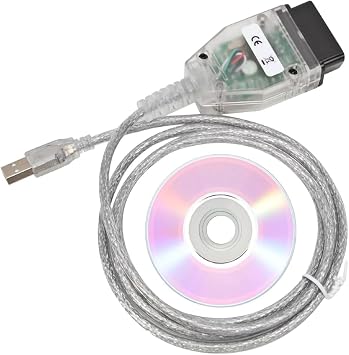
Mini Vci J2534 Cable for Toyota able Connector Scanner Adapter for Toyota TIS Techstream, 16pin Programming Diagnostic Cable TIS Techstream OBD2 USB
83% of respondents would recommend this to a friend
Item #:
23517678
GBP 32
Price Details
Excluding Shipping & Custom charges ( Shipping and custom charges will be calculated on checkout )
*All items will import from US
27%
0 ratings
Write a review
In stock
 Imported from USA store
QTY:
Only 2 items left in stock.
Order now and get it around Friday, October 02
Secured transaction
Ubuy works hard to protect your security and privacy. Our advanced payment security system ensures confidentiality by encrypting your information during transmission using AES (Advanced Encryption Standards) and SSL (Secure Socket Layer) protocols. Your payment details are 100% secure as we do not share your payment details with third party sellers.
Our Top Logistics Partners


16Pin OBD2 MINI VCI Diagnostic USB Cable Supported Protocols - K-Line ISO 9141, KWP 2000 ISO 14230-4, SAE J1850 PWM, SAE J1850 VPW, CAN 2.0B ISO 11898, CAN ISO 15765-4

Fast
Shipping

Free
Return*

Secure Packaging

100% Original Products

PCI DSS Compliance

ISO 27001 Certified



Note: Step Down Voltage Transformer required for using electronics products of US store (110-120). Recommended power converters Buy Now.


What Stands Out
Versatile Compatibility
This Mini VCI J2534 Cable offers seamless compatibility with Toyota's TIS Techstream, catering to multiple diagnostic needs across various Toyota models, ensuring effective vehicle communication and performance diagnostics.
Enhanced Diagnostic Functionality
Equipped with advanced programming capabilities, this adapter provides comprehensive diagnostic functions, making it ideal for professional mechanics as well as dedicated car enthusiasts seeking precise vehicle maintenance.
User-Friendly Design
Designed for ease of use, this cable connects effortlessly to OBD2 ports and computers running Windows XP or WIN7, allowing users to quickly access and interpret vehicle diagnostic data for efficient repairs.
Product Details
- Supports all diagnostic communication protocols needed for Toyota vehicles since 1996
- Compatible with Windows XP and Windows 7 32-bit systems
- Functions include check engine light shut off, multi-language interface, freeze frame displays, and internet updateable
- Durable and premium quality 16Pin OBD2 MINI VCI diagnostic USB cable
- Made of sturdy and abrasion-resistant material for long-lasting usage
- Not recommended for those lacking car and computer knowledge or who prefer not to use remote assist
| Compatible Devices | Desktop, Laptop, Toyota, Windows |
| Connector Type | USB Type A |
| Number of Ports | 2 |
| Power Plug Type | 16A 5 Pin |
| Brand | KUJOBUY |
| Model Number | Mini Vci J2534 Cable |
| UPC | 365779582530 |
| Manufacturer | KUJOBUY |
| Mfr Part Number | J2534 |
| Item Weight | 0.09 kg |
| Package Quantity | 1 |
| Unit Count | 1 Count |
| Number of Items | 1 |
| Color | Black |
| Finish | Matte |
| Finish Type | Matte |
Who Should Buy?

-
Toyota Technicians
Ideal for professionals who need to diagnose and program Toyota vehicles effectively with TIS Techstream software.
-
Car Enthusiasts
Perfect for dedicated hobbyists who want to perform advanced diagnostics and maintenance on their Toyota vehicles.
-
Budget-Conscious Users
Provides an affordable option for those seeking advanced diagnostic capabilities without expensive dealer tools.

-
Non-Toyota Vehicles
Not suitable for diagnosing or programming vehicles not manufactured by Toyota, limiting its use for other brands.
Product Description
Have any Query? Chat with us
Customer Questions & Answers
-
Question:
What is the Mini Vci J2534 cable used for?
Answer: The Mini Vci J2534 cable is designed to interface with Toyota vehicles for diagnostics and programming. It enables users to connect their vehicle’s onboard diagnostic system to a computer running the TIS Techstream software, allowing for advanced diagnostics, programming, and reprogramming of modules and ECUs. This is particularly useful for automotive technicians or enthusiasts who want detailed insight into vehicle performance or to reset fault codes. -
Question:
Is the Mini Vci J2534 compatible with all Toyota models?
Answer: While the Mini Vci J2534 is compatible with most Toyota models, compatibility might vary depending on the vehicle year and the specific functions required. Generally, it supports a wide array of Toyota vehicles starting from around 1996 onwards. Before purchasing, it's advisable to check vehicle compatibility to ensure that the cable can effectively communicate with your car's systems for diagnostics. -
Question:
How does the Mini Vci J2534 cable connect to my vehicle?
Answer: The Mini Vci J2534 cable connects to your vehicle through the 16-pin OBD2 diagnostic port, typically located under the dashboard near the steering column. Once connected, the other end plugs into a USB port on your laptop or PC, allowing it to communicate with the vehicle's onboard diagnostic system when running the TIS Techstream software. This setup enables detailed diagnostics and module programming. -
Question:
What software is required for the Mini Vci J2534 cable?
Answer: The Mini Vci J2534 cable requires the Toyota Techstream software to function effectively. This software can be easily installed on Windows-based PCs or laptops. Once installed, it provides a comprehensive interface for performing diagnostics, programming, and other functions necessary for maintaining and repairing Toyota vehicles. -
Question:
Can I use the Mini Vci J2534 for other brands of vehicles?
Answer: The Mini Vci J2534 is specifically designed for Toyota and Lexus vehicles, and its functionality is tailored to Toyota's proprietary systems. While it might have limited diagnostic ability with some other brands' vehicles, its primary usage and reliability are guaranteed with Toyota vehicles. For optimal performance, use it solely with Toyota and Lexus models. -
Question:
What should I do if the Mini Vci J2534 cable won't connect?
Answer: If your Mini Vci J2534 cable doesn't connect, first confirm that the TIS Techstream software is correctly installed and updated. Ensure that the cable is properly connected to both the vehicle's OBD2 port and your computer. Additionally, check your laptop's USB ports and drivers, as outdated or incompatible drivers may prevent connection. If issues persist, consult the user manual or online forums for troubleshooting tips. -
Question:
Is the Mini Vci J2534 cable plug-and-play?
Answer: The Mini Vci J2534 cable requires initial installation of the TIS Techstream software but is otherwise plug-and-play in terms of connectivity. Once the software is set up, simply connect the cable to your vehicle and computer to begin diagnostics. This straightforward setup process makes it accessible for both seasoned professionals and hobbyists alike. -
Question:
Where can I find drivers for the Mini Vci J2534 cable?
Answer: Drivers for the Mini Vci J2534 cable typically come bundled with the installation of the TIS Techstream software. During the software installation process, necessary drivers are installed automatically. If additional drivers are needed, they can usually be found on dedicated automotive forums or support websites related to Toyota diagnostics. -
Question:
Can I perform ECU programming with the Mini Vci J2534 cable?
Answer: Yes, the Mini Vci J2534 cable can be used for ECU programming alongside diagnostics when connected with the TIS Techstream software. This capability allows professionals to update or flash various electronic control units within Toyota vehicles, which can be critical for fixing issues or improving vehicle performance after repairs. -
Question:
Where can I buy the Mini Vci J2534 cable in Guernsey?
Answer: You can purchase the Mini Vci J2534 cable from Ubuy in Guernsey. Ubuy provides a wide selection of automotive diagnostic tools, including the Mini Vci J2534 cable, ensuring you have access to reliable and high-quality products for your Toyota diagnostics needs. Shopping through Ubuy also offers convenient access to customer support should you have queries regarding your purchase.
KUJOBUY Code Readers & Scan Tools Mini Vci J2534 Cable Editorial Review
No editorial reviews found
Customer Reviews & Ratings
125 customers ratings
-
5 Star
46%
-
4 Star
12%
-
3 Star
5%
-
2 Star
10%
-
1 Star
27%
Review this product
Share your thoughts with other customers
Platform Trust & Buyer Confidence

JK
Jasmin
Verified buyer
“Great products and very good service: very easy and very fast international delivery.”
9 September 2026 · via Trustpilot
AG
Anke
Verified buyer
“Wonderful online shopping experience, smooth transaction from the start. Payment method works conveniently and delivery is unexpectedly fast and reliable. You go the extra mile for service. What makes this even more amazing, you deliver to Namibia. I will remain a happy Ubuy customer and will increase my purchases for sure! Thank you!”
10 September 2026 · via Trustpilot
H
Hazel
Verified buyer
“Very easy to find the products what you need, and so fast delivery, that’s why I highly recommended to others costumers to used ubuy.”
10 September 2026 · via Trustpilot
O
Opaleye
Verified buyer
“I received exactly what I ordered I was skeptical about your site because that was my first time to order. But the order came timely and neatly packaged. I was not disappointed. Thank you.”
11 September 2026 · via Trustpilot
AC
Adele
Verified buyer
“Easy to find and order what you want on the website. Delivery is quick to the UK”
8 September 2026 · via Trustpilot
Secure Checkout
Global Delivery
Easy Returns
Genuine Products
Product Price History
Important information
- Limitations : For products shipped internationally, please note that any manufacturer warranty may not be valid; manufacturer service options may not be available; product manuals, instructions, and safety warnings may not be in destination country languages; the products (and accompanying materials) may not be designed in accordance with destination country standards, specifications, and labeling requirements; and the products may not conform to destination country voltage and other electrical standards (requiring use of an adapter or converter if appropriate). The recipient is responsible for assuring that the product can be lawfully imported to the destination country. When ordering from Ubuy or its affiliates, the recipient is the importer of record and must comply with all laws and regulations of the destination country.
- Not all the products listed on Ubuy are for sale, as Ubuy is a global search engine. Products are subject to export/trade regulations.
GBP 32
Order now and get it around Friday, October 02
This item is not restrict in my country.(Please click on above link if this item is not restrict in your country, So our team will review and allow.)
QTY:
Only 2 items left in stock.
Secured transaction
PCI DSS compliant and ISO 27001:2022 certified, with encrypted payments and full buyer protection on every order.
Our Top Logistics Partners
Fastest cross-border delivery
Ubuy Assurance
Experience worry-free shopping with 100% original products, PCI DSS-compliant payment security, ISO 27001-certified data protection, the fastest cross-border delivery, free returns *, and secure packaging on every order.